













Kingmaker Casino: Mobile Experience and Device Support
Kingmaker Casino Mobile Experience: App vs Browser Play
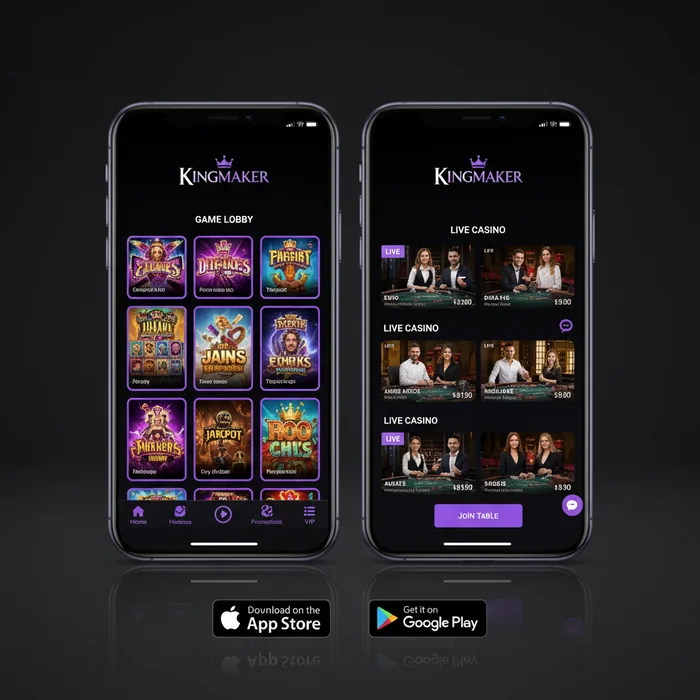
The Kingmaker Casino mobile experience is built around one core principle: you shouldn't need to download anything to access the full platform. Unlike many competitors who gate their best features behind a proprietary app, we've designed the entire Kingmaker Casino interface to run natively inside your mobile browser — no installation required, no APK files, no App Store approvals to wait on.
That said, there are real differences between how the platform behaves on different devices and access methods. First, let's understand exactly what you're working with — and where the honest trade-offs sit — so you can make the right choice for how you actually play.
Is There a Dedicated Kingmaker Casino App or a Mobile Site
There is no standalone Kingmaker Casino app available for download on the Apple App Store or Google Play Store. What we offer instead is a fully responsive mobile site accessible at wincasino-kingmaker.com — optimized specifically for touchscreen navigation, portrait and landscape orientation, and mobile data efficiency. This means that the Kingmaker Casino download question has a simple answer: there's nothing to download.
In simple terms, you open your browser, navigate to the site, and the platform automatically detects your device and serves the mobile-optimized version. You can add the site to your home screen on both iOS and Android, which creates a shortcut that behaves almost identically to a native app — including full-screen display without browser chrome. This approach also means you always have the most current version without manual updates.
One honest limitation worth flagging: without a native app, you won't receive push notifications by default. Some players find this a drawback, particularly if they want alerts about cashback windows or bonus expiry deadlines. We're transparent about this — if push alerts are important to your play style, a native app environment would serve you better.
Comparing Performance on iOS and Android Devices
Kingmaker Casino iOS performance is strong on Safari, which is the recommended browser for Apple devices. The platform loads cleanly on iPhone models running iOS 13 and above, with game rendering handled through HTML5 — meaning no Flash dependencies and no compatibility gaps. Live casino streams, in particular, perform reliably on iOS Safari without the frame-drop issues some third-party apps introduce.
Kingmaker Casino Android users have slightly more flexibility: Chrome, Firefox, and Samsung Internet all handle the mobile site well. Android devices running version 8.0 (Oreo) and above are fully supported. One insider note — if you're on an older Android device with limited RAM, closing background apps before launching live dealer games will noticeably improve stream stability.
| Platform | Minimum Version | Access Method | Recommended Browser |
|---|---|---|---|
| iOS (iPhone/iPad) | iOS 13+ | Mobile Browser | Safari |
| Android | Android 8.0+ | Mobile Browser | Chrome |
| Windows (Desktop) | Windows 10+ | Desktop Browser | Chrome / Firefox |
| Mobile Browser (General) | Any modern browser | Responsive Site | Any HTML5-capable |
| Tablet (iOS/Android) | Same as above | Mobile Browser | Safari / Chrome |
Accessing All 8000 Games Through the Mobile Platform
Our full library of 8,000 games is accessible through the mobile browser — this isn't a reduced catalogue or a "mobile lite" version. The same titles available on desktop are available on your phone, organized by the same categories, with the same RTP values and betting limits applying across both environments.
Which Game Categories Are Fully Available on Mobile
Every major category in our 8,000-title library renders correctly on mobile: video slots, live dealer tables, table games, crash games, and the Bonus Crab feature — our proprietary real-money prize mechanic that activates randomly during eligible sessions. Slots make up the largest share of the catalogue and are the most naturally suited to mobile play, since portrait-mode spinning requires no interface compromise.
Live casino is where mobile play gets more nuanced. The streams from our live dealer partners run at adaptive bitrates, which means on a strong 4G or Wi-Fi connection you'll get HD quality; on a weaker signal, the stream automatically steps down to maintain continuity rather than buffering. This is above the industry standard for adaptive streaming behaviour — many platforms simply freeze or disconnect under signal pressure.
| Feature | Mobile | Desktop | Winner |
|---|---|---|---|
| Game selection | 8,000 titles | 8,000 titles | Tie |
| Loading speed | Optimized HTML5 | Standard load | Mobile (lighter assets) |
| Live casino | Full access, adaptive stream | Full access, HD default | Desktop (larger screen) |
| Bonuses | Same offers | Same offers | Tie |
| Payment methods | Visa, Neteller, Skrill, Bitcoin | All methods | Tie (all available on mobile) |
| Multi-tabling | Single game focus | Multiple windows | Desktop |
| Push notifications | Not available (no native app) | Not available | Neither |
| Screen quality | Sharp but smaller | Larger display | Desktop (for live games) |
When mobile is the better choice: quick slot sessions during a commute, accessing your cashback balance between sessions, or placing a fast deposit when you're away from your desk. When desktop wins: extended live dealer sessions where screen real estate matters, multi-game browsing, or managing complex bonus wagering across multiple titles simultaneously.
Making Deposits and Withdrawals via Mobile Including Bitcoin
Every payment method we support is fully functional through the mobile browser — there are no desktop-only payment options. The minimum deposit of €20 applies equally on mobile, and the same processing timelines govern both environments. This is one area where our mobile implementation is genuinely at parity with desktop, not a stripped-down version.
Using Neteller, Skrill, and Visa on a Mobile Browser
Neteller and Skrill are the two e-wallet options we support, and both process withdrawals within 0–24 hours — which is at or below the industry average of 24–48 hours for e-wallet payouts. On mobile, the deposit flow for both redirects you to the respective e-wallet's own mobile-optimized page, then returns you to your Kingmaker Casino account automatically. The entire deposit process typically takes under 90 seconds on a stable connection.
Visa deposits are processed instantly on mobile, just as on desktop. One detail that players don't always discover until after sign-up: Visa withdrawals are subject to standard card processing timelines of 3–5 business days, which is significantly slower than the e-wallet route. If withdrawal speed matters to you, Neteller or Skrill is the right choice — not Visa. We'd rather you know this before you choose your payment method than after you've submitted a withdrawal request.
There are no fees charged by the platform on deposits or withdrawals for any of these methods. However, your card issuer or e-wallet provider may apply their own currency conversion fees if your account is denominated in a currency other than EUR — this is outside our control and varies by provider.
Bitcoin Transactions on Mobile: Speed and Convenience
Bitcoin is our crypto payment option, and it's where mobile actually has a practical advantage over desktop. On mobile, you can scan the deposit wallet address directly using your phone's camera through your crypto wallet app — no manual address copying required. This eliminates the most common source of crypto deposit errors (address transcription mistakes) and makes the process faster than the desktop equivalent.
Bitcoin deposit confirmations depend on network congestion, but under normal conditions funds appear within 10–30 minutes. Bitcoin withdrawals follow the same 0–24 hour processing window as e-wallets from our side, after which blockchain confirmation time applies. One thing to understand: Bitcoin transaction fees (the network "gas" fee) are paid by the sender — when you withdraw, the fee comes from the network, not from us, and the amount varies with network load.
Mobile Live Chat Support and Account Management on the Go
Account management — including bonus tracking, cashback claims, deposit history, and personal details — is fully accessible through the mobile interface. The login page is touch-optimized, and the account dashboard reorganizes into a single-column layout on smaller screens without losing any functionality. Nothing is hidden behind a "desktop only" restriction.
How to Contact Support via Live Chat from a Mobile Device
Live chat is the primary support channel we offer, and it works without issue on mobile browsers. The chat widget loads in a floating overlay that doesn't interrupt your game session — you can have a support conversation running while a slot game is paused in the background. Response times through live chat are typically faster than email, which is the secondary contact option.
To reach live chat on mobile: tap the chat icon (bottom-right corner of the screen), enter your query, and you'll be connected to an agent. If you're logged in, your account details are automatically visible to the support team — you won't need to repeat your username or verify your identity from scratch. This is a small but meaningful time-saver that many players only notice after their first support interaction.
One honest limitation: there is no phone support option. If you prefer voice communication for complex account issues, this platform isn't structured for that. Live chat and email are the two channels available, and for the majority of account queries — bonus disputes, withdrawal status checks, verification questions — live chat resolves things within a single session.
Managing Bonuses and Cashback Offers Through the Mobile Interface
The Kingmaker Casino mobile bonus system mirrors the desktop experience exactly — there are no mobile-exclusive offers, but equally, no offers are restricted to desktop only. The welcome bonus of 100% match up to €500 plus 50 free spins on Royal Fortune Wheel is claimable and trackable entirely through mobile. The wagering requirement is 35x on the combined bonus and deposit amount — so on a €20 deposit with a €20 bonus, you're looking at €1,400 in total wagering before withdrawal eligibility.
Free spin winnings carry a separate 40x wagering requirement, which is above the industry standard of 30–35x. This is the kind of fine print that matters: if you win €10 from the 50 free spins, you need to wager €400 from those winnings alone before they become withdrawable. Track your wagering progress through the account dashboard — on mobile, this displays as a progress bar under the active bonus section, updated in real time after each eligible bet.
The regular cashback feature is managed through the cashback page, accessible on mobile with the same interface as desktop. Cashback is calculated on net losses over a defined period — check the current cashback rate and qualifying period in your account, as these can vary. One thing to watch: cashback offers often have a claim window (typically 24–72 hours after the cashback period closes). Missing this window means forfeiting the credit. Set a reminder on your phone — since there are no push notifications available through the mobile browser, this is something you need to manage manually.
- €20 deposit + €20 bonus = €40 total → 35x wagering = €1,400 required
- €500 deposit + €500 bonus = €1,000 total → 35x wagering = €35,000 required
- 50 free spin winnings (e.g. €10) → 40x = €400 additional wagering
Ready to access all of this from your phone? Create your Kingmaker account and the full mobile platform — all 8,000 games, every payment method, live chat support, and real-time bonus tracking — is available the moment your registration is confirmed. The remaining question most players have at this point is whether the mobile experience will feel as complete as desktop: based on what we've built, the honest answer is yes for almost everything except multi-tabling and screen size — and those are trade-offs inherent to any mobile device, not decisions made by Kingmaker Casino.